
Before and after marketing for restoration companies works by turning every documented job into five platform-specific content assets: a static side-by-side for Facebook and Google Business Profile, an Instagram Reel, a 60-90 second time-lapse for TikTok and YouTube Shorts, a Nextdoor neighborhood post, and a GBP photo upload tagged to the right service category. The system starts with CompanyCam for GPS-tagged photo capture, uses Canva and CapCut for asset creation, and closes the loop with Podium or NiceJob for automated review requests. Three quality posts per week beats daily posting followed by a two-week silence. The real ROI is not follower growth — it is pre-qualifying homeowners so that when a pipe bursts at 11pm, they already recognize your name and call you first.
-
5 assetsContent pieces produced from one CompanyCam job folder
-
3-5 posts/weekOptimal cadence for restoration companies — quality beats volume
-
+42% direction requestsGBP lift from active photo posting (BrightLocal 2025)
-
45 min/weekTime to maintain the full system after initial setup
-
46% phone conversionPhone leads convert nearly 6x the overall 7.8% average
-
$188/mo tool costTotal for CompanyCam Core plus CallRail Call Tracking plan
Before and after marketing for restoration companies is the only content format that simultaneously answers the three questions every property owner asks before hiring: Can you do the work? Have you done it before? Will my property look normal again? A single before/after post answers all three in one scroll-stop moment — no brochure, no sales call, no explanation required. The U.S. disaster restoration services market hit $7.1 billion in 2026 (IBISWorld), and competition for local search results and social visibility is intensifying. The restoration businesses that build a repeatable documentation-to-distribution system now will hold a structural content advantage over those still posting one-off job photos. This 7-step system takes 3-5 hours to set up and 30-45 minutes per week to maintain. It turns every CompanyCam job folder into five platform-ready assets, drives review velocity, and pre-qualifies potential clients before they dial.
Before you start
- Active CompanyCam account (Core tier starts at $63/month with annual billing) with GPS-tagged photo capture enabled on every job
- Verified Google Business Profile with at least one service category correctly set — water damage restoration, fire damage restoration, or mold remediation
- Facebook Business Page and Instagram Business account linked through Meta Business Suite
- Nextdoor Business account claimed for your primary service area ZIP codes
- A review-request workflow through Podium, NiceJob, or a direct Google review link sent via text after job close
- Written permission policy for photographing job sites — one signed line on your work authorization covers this and protects you with insurers
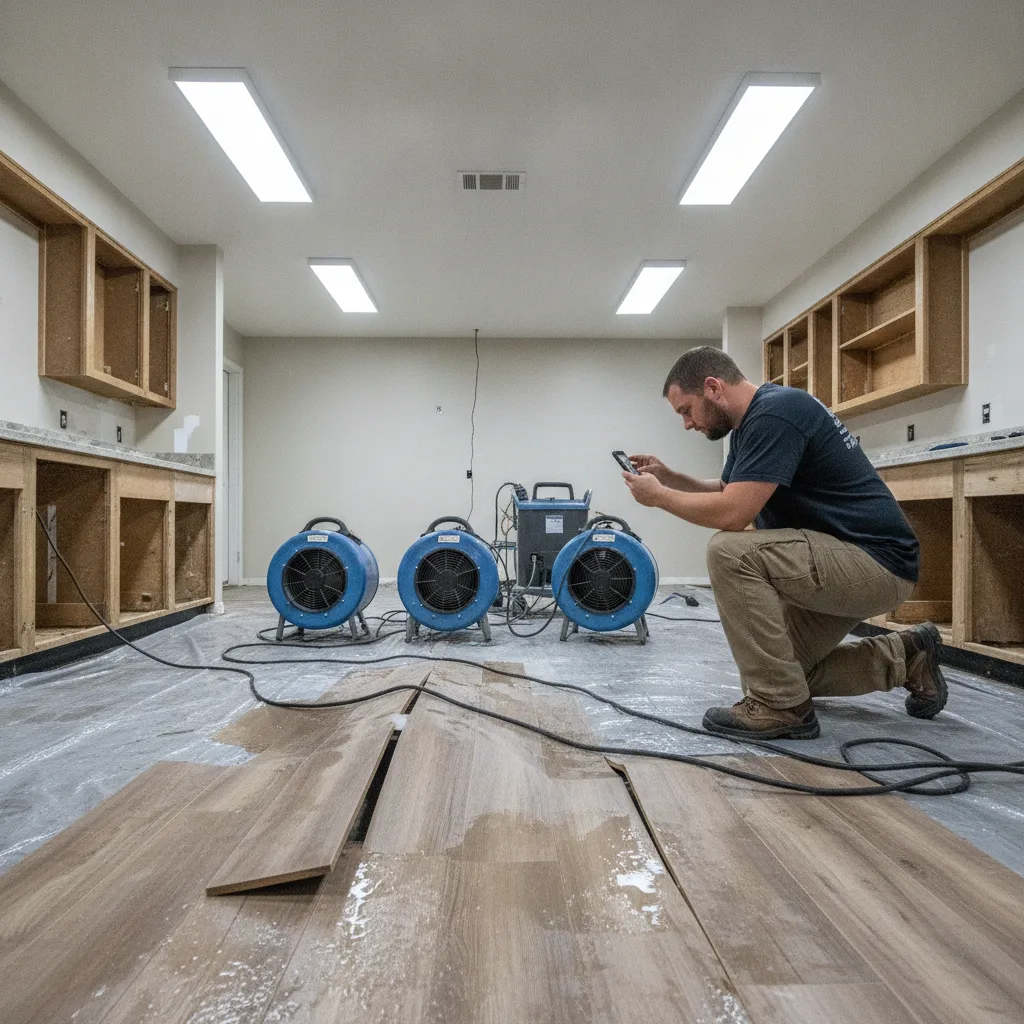
Capture Job-Site Photos the Right Way with CompanyCam
Before and after marketing for restoration companies collapses without a disciplined photo-capture habit on every job — not just the dramatic ones. CompanyCam solves this by automatically GPS-tagging and time-stamping every photo the moment your technician takes it, creating an audit trail that doubles as insurance documentation and social media content. As of 2026, more than 100,000 contractors use the platform, and its integrations with Jobber, ServiceTitan, and Housecall Pro mean photos attach directly to the job record without manual sorting.
The capture protocol matters as much as the tool. Require technicians to photograph four moments on every water damage restoration, fire damage, or mold remediation job: arrival condition (wide shot of the affected area), close-up of the worst damage detail, equipment in place mid-process, and final completion. That four-photo sequence is the raw material for every content format in the steps below. A restoration business that skips the mid-process shot loses the frame that answers the homeowner's hardest question: What does that actually look like while your crew is inside my house?
Set CompanyCam project folders to mirror your service types — water damage, fire damage, mold remediation, storm damage — so content can be pulled by category when you need seasonal posts. Tag the lead technician in each project folder. You will need that name for the caption strategy in Step 3. Restoration companies that organize folders this way also build a library of case studies and proof points they can use across service pages on the website, in email marketing campaigns, and in Google Ads creative.
CompanyCam
$63/month (1-user Core, annual billing); $79/month for 3-user Pro plan
GPS-tagged, time-stamped job photos that serve dual duty as insurance documentation and social media content, with direct integrations to major field-service platforms.
Permission first
Add one sentence to your work authorization: 'Client authorizes [Company Name] to photograph the property for documentation and marketing purposes.' This covers you with insurers, adjusters, and platforms that require proof of consent before featuring residential properties.
Build Five Content Assets from One Job Folder
One completed job folder in CompanyCam should produce five distinct content assets — not one post. The asset map: (1) a static side-by-side before/after image for Facebook and Google Business Profile, (2) a 15-30 second Instagram Reel using the four-photo sequence with a trending audio track, (3) a 60-90 second time-lapse video for YouTube Shorts and TikTok, (4) a single dramatic after photo for Nextdoor with a neighborhood-specific caption, and (5) a GBP photo upload tagged to the correct service category. That five-asset output from one job is the core of a sustainable restoration marketing system — it ends the 'we don't have time to post' objection permanently.
For the static side-by-side, use Canva (free tier works) with a two-column template: left column labeled BEFORE in your brand color, right column labeled AFTER. Keep the image ratio at 1:1 for Facebook and 4:5 for Instagram. Export both versions from the same design file — under three minutes per job. For the Reel and time-lapse, CapCut (free) assembles the four CompanyCam photos into a scroll-stopping clip in under ten minutes using its Photo Movie feature with a manual speed adjustment to hit the 15-30 second window.
Restoration companies that treat each job as a single post instead of a five-asset content batch produce one-fifth the output from the same effort. Time-lapse restoration videos showing complete projects in 60-90 seconds consistently produce the highest engagement of all restoration content types — and they require no voice-over, no script, and no video editing experience beyond CapCut's auto-trim feature. That is proven strategy based on real platform data, not theory.
Canva
Free (Pro at $15/month adds brand kit and background remover)
Fast before/after side-by-side templates with 1:1 and 4:5 export presets for Facebook and Instagram without a designer.
CapCut
Free
Assembles CompanyCam photo sequences into 15-30 second Reels and 60-90 second time-lapse videos in under ten minutes per job.
Write Captions That Convert Viewers Into Callers
Caption strategy is where most restoration companies forfeit the conversion. A caption that reads 'Water damage job complete in Austin' informs no one and compels no one to call. A caption that reads 'Here's why water trapped under flooring causes hidden mold growth — and what we did to stop it before it reached the subfloor' turns the same post into educational content that demonstrates expertise and answers the question a property owner is already asking. Per Edelman's Trust Barometer research as of 2026, 81% of consumers say trust is the deciding factor when choosing a service provider, and educational content is one of the fastest paths to earning it.
Use this four-part caption structure for every before/after post: (1) Lead with the problem as a fact — 'Standing water left for 48 hours activates mold spores.' (2) Name what you found — 'This Pflugerville kitchen had water sitting under the LVP for four days before the owner called.' (3) State what you did — 'We extracted, dried, and treated the subfloor in 72 hours, saving the cabinet bases.' (4) Close with a direct call to action — 'If you're seeing warped floors or a musty smell, call us before it spreads: [phone number].' That structure answers all three homeowner decision questions in a single scroll-stop moment: Can you do the work? Yes. Have you done it before? Here's the proof. Will my property look normal again? See the after photo. This caption formula doubles as a template that lets you educate clients on restoration processes without writing a blog post.
Tag the lead technician by name and tag any subcontractors, material suppliers, or insurance partners involved. Restoration companies that tag team members and business partners in before/after posts see 10x-100x more engagement than untagged posts of identical content. That engagement multiplier costs nothing and takes fifteen seconds. It also broadens organic reach into networks your business would never access with an untagged post — a supplier's 4,000 followers or a subcontractor's local community see your work without a dollar of ad spend.
Slowest step
Writing captions is the step most owners skip or rush. Block 45 minutes every Monday to write captions for the week's job photos pulled from CompanyCam. Batching this task produces better copy than writing post-by-post and protects your 3-5 posts-per-week cadence from collapsing under daily pressures.

Distribute Across Five Platforms with a Role for Each
Each platform in your restoration marketing strategy serves a distinct role — and conflating them wastes content on the wrong audience. Facebook is your primary emergency lead channel: home services accounts average 0.21% engagement there, so the goal is not virality but community presence and direct-message inquiry. Post the static before/after with your full educational caption, tag your service area city, and enable the 'Get a Quote' call-to-action button on every post. Instagram handles visual proof for potential clients who find you after a referral — post the 4:5 Reel with a condensed caption and three location hashtags (city plus 'water damage restoration service' plus your service type). Google Business Profile is the local SEO workhorse: GBP profiles with photos get 42% more direction requests and 35% more website click-throughs than those without, per BrightLocal's 2025 study. Upload the after photo to your GBP under the right categories within 24 hours of job completion.
TikTok and YouTube Shorts handle reach and brand awareness for the long term. TikTok's CPC sits at $1.00 compared to $12.18 for electrician search ads and $10.70 for roofing search campaigns — so even a modest paid boost on a strong time-lapse video builds local visibility at a fraction of search engine marketing costs. Upload the 60-90 second time-lapse to both platforms using the same file, with captions adapted to each audience. YouTube Shorts favors a slightly longer description with local keywords that improve search results rankings; TikTok rewards a hook in the first two seconds that names the damage type and the city. Both platforms expand your online visibility beyond the local market you would reach with Facebook alone.
Nextdoor is the most underused platform in restoration marketing. Its 46.1 million weekly active users are 75% homeowners, and they are 161% more likely to be interested in home remodeling than users on other platforms. Post the after photo with a neighborhood-specific caption — 'We just finished a mold remediation job two streets over in [Subdivision Name]' — and enable Nextdoor's weather-based ad targeting, which launched in late 2025, to push storm-specific posts automatically when neighborhoods in your service area experience high winds or heavy rain. That targeting feature is one of the highest-value digital marketing strategies in emergency service marketing right now, because it lets you speak directly to local customers at the exact moment they need your restoration services.
Platform priority if you're starting from zero
Start with Facebook and GBP. Those two platforms together cover emergency lead trust-building and local SEO impact. Add Instagram Reels in month two, Nextdoor in month three, and TikTok/YouTube Shorts once you have a backlog of time-lapse videos. Trying to operate all five at launch produces thin, inconsistent content on every platform.
Set a Posting Cadence That Survives Real Job Volume
Three quality before/after posts per week beats daily posting for a month followed by two weeks of silence. Industry consensus and the Cleanfax 2025 Benchmarking Survey both point to 3-5 posts per week as the optimal cadence for restoration companies — enough to stay visible to the Facebook algorithm and Google Business Profile freshness signals without sacrificing content quality. HubSpot data shows consistent social media posters achieve up to 5x higher engagement than irregular posters, and in the restoration industry 'irregular' often means posting only during storm season then going dark.
Build a simple content calendar with three post types on rotation: Project Post (before/after with educational caption), Trust Post (video testimonial from past clients or a screenshot of a 5-star Google review with the reviewer's first name), and Educational Post (a 'why this happens' explanation — mold growth timelines, what smoke odor means for HVAC, how long drying actually takes). That three-type rotation fills a full week with two project posts and one educational post, or two educational posts and one testimonial. It also ensures you hit the search engine optimization need for fresh, keyword-relevant content without requiring a content strategist. Rotating formats also prevents audience fatigue, which is the hidden reason restoration businesses stall on engagement after a strong start.
Schedule using Meta Business Suite (free) for Facebook and Instagram, and use Google's built-in GBP post scheduler for the weekly photo upload. Nextdoor posts require manual publishing. Set a recurring 30-minute Friday block to schedule the following week — this is the single habit that separates restoration businesses with a real digital marketing presence from those with an abandoned Facebook page. Long-term success in local search results and social visibility is not about any single marketing tactic. It is about showing up with the same consistency your best technicians show up at a job site.
Meta Business Suite
Free
Schedules Facebook and Instagram posts simultaneously, tracks engagement metrics, and manages direct messages from potential clients in one inbox.
Turn Every Job Into a Review and a Google Business Profile Signal
Video testimonials carry 89% more credibility than written reviews for restoration services, and they improve landing page conversions by 32%. The ask is simple: at job closeout, have the lead technician say, 'Would you be willing to record a 30-second video on your phone telling us what the process was like?' Sixty percent of happy clients who are asked in person say yes. That video goes to Instagram Reels (trimmed to 15-30 seconds), to the website's testimonial section, and to the Google Business Profile as a photo post. One 90-second phone recording becomes three content assets and one trust signal. Authentic staff photos and real client faces also improve website conversions by 17.2% (VWO research) — the same principle applies to video.
Written online reviews still matter for local SEO and for the 68% of consumers who require a 4-star minimum before contacting a restoration service provider (as of 2026). Send a direct Google review link via SMS within four hours of job completion — restoration companies that respond to every review within four hours see further boosts in their Local Services Ad rankings. Use Podium or NiceJob to automate the text trigger from a job-closed status in your field-service software. Both platforms integrate with ServiceTitan and Jobber and cost $200-$350/month combined, which is less than one missed emergency job. Positive reviews also reduce negative review impact by building a volume buffer that keeps your rating above the 4-star floor most potential customers require.
Every new 5-star review with a response is a fresh GBP signal. Responding to reviews with the service type and city name embedded — 'Thank you for trusting us with your water damage restoration service in Round Rock' — reinforces local keywords in local search results without requiring additional search engine optimization work. That is internet marketing at its most efficient: one review response does double duty as a trust signal for the next potential client reading the profile and as a local keyword placement for the search engine. Restoration companies that build review velocity this way generate more leads from their GBP than from paid Google Ads in markets below 500,000 population.
Podium
$249-$449/month depending on plan
Automates SMS review requests at job close, manages Google and Facebook reviews in one inbox, and tracks review velocity over time.
NiceJob
$75/month (Grow plan)
Lower-cost review automation alternative with direct Jobber and Housecall Pro integrations and a built-in review widget for your website.
Measure Trust Signals, Not Vanity Metrics
Home services accounts average 0.43% engagement on Instagram and 0.21% on Facebook — so chasing follower counts and like totals is the wrong target for restoration marketing. The metrics that predict revenue are: (1) GBP direction requests and website clicks (track monthly in the GBP Insights tab — the benchmark lift from active photo posting is 35-42%), (2) review velocity (new reviews per week, with a floor of two per week for a company doing 10-plus jobs monthly), (3) inbound call volume from social profiles (use CallRail to assign a unique tracking number to Facebook and Nextdoor bios), and (4) Instagram Reel watch time (target 60%-plus average view duration on your 15-30 second clips, which signals to the algorithm that your content is worth distributing in local searches).
Track conversions with a simple monthly scorecard: GBP photo views, GBP calls, review count delta, CallRail social-attributed calls, and Reel average watch time. If GBP photo views are rising but calls are flat, the problem is the GBP call-to-action or the phone number placement — not the content quality. If Reel watch time drops below 40%, the first two seconds of your videos need a stronger hook. These five numbers tell you more about whether your digital marketing efforts are working than any vanity report a marketing agency might build around follower growth. They also put you on the same page as any agency partner you bring in later, because the metrics are objective and tied to lead generation.
The lead-to-customer conversion benchmark for home services in 2026 is 7.8% overall, but phone leads convert at 46% — nearly six times higher. Social media for restoration companies does not generate emergency calls directly. It pre-qualifies potential customers so that when a pipe bursts at 11pm and the homeowner searches Google Maps and recognizes your name from a neighbor's Nextdoor post, they call you first. That is the real ROI equation: social trust content and a strategy-based approach to content reduces the sales friction on a phone call that was going to happen anyway. Building that trust infrastructure also supports long-term success across other channels — email marketing, local directories, and referral networks all perform better when the brand already has proof-of-work visible online.
CallRail
$45/month (Call Tracking plan)
Assigns unique tracking numbers to each social platform bio so you know exactly which channel drove an inbound call — the only way to tie social media activity to revenue.
What to do if results stall at month two
If review velocity and GBP calls plateau after 60 days, add one Nextdoor neighborhood post per week with a city-specific caption and activate Nextdoor's weather-based targeting for your top three ZIP codes. That single addition consistently unsticks local visibility for restoration businesses in markets with active Nextdoor communities.

Don't Let One Competitor Claim Your Neighborhood on Nextdoor First
Nextdoor's weather-based targeting — active as of late 2025 — lets a restoration company push storm-specific before/after content to every homeowner in an affected neighborhood within hours of a weather event. The restoration businesses that have their Nextdoor Business account set up, their ad creative ready, and their targeting configured before storm season will own those neighborhoods. The ones that set it up after the fact will watch a competitor collect the leads. This is a first-mover window in competitive Texas markets like Houston, San Antonio, and DFW. It will not stay open long.
Before and after marketing for restoration companies is not a social media tactic — it is a trust infrastructure. The system in these seven steps does one thing: it ensures that when a homeowner in your service area experiences water damage, fire damage, or mold growth, they have already seen your work, already read your educational content, and already absorbed a neighbor's recommendation. By the time they dial, the sale is 80% closed. Follower counts don't do that. A repeatable documentation-to-distribution system does. Start with CompanyCam and GBP this week. Add Nextdoor targeting before the next storm season hits. Measure the five trust-signal metrics — not likes. The restoration companies that build this system in 2026 will be the ones competitors are trying to catch in 2027.
Frequently Asked Questions
Ready to get started? Contact Geek Powered Studios today.