
A plastic surgery website design that books consultations treats its before/after gallery as three things at once: a HIPAA-compliant legal record, a technical performance asset, and a conversion funnel. Every photo needs a separate signed HIPAA photo authorization (not bundled into clinical consent), stored for a minimum of six years. The gallery architecture should be filterable by procedure and body area, built on per-case URLs that capture long-tail search traffic, and optimized to load under three seconds on mobile devices — where over 60% of plastic surgery searches originate as of 2026. A financing calculator embedded below gallery cases removes sticker shock on $7,000–$18,000 procedures. HHS penalties run $100–$50,000 per violation, so the compliance layer is not optional. Total setup time: three to five hours for planning and vendor selection, two to four weeks for full implementation.
-
$100–$50,000HIPAA penalty range per non-compliant gallery photo
-
6 yearsMinimum HIPAA photo authorization retention period
-
83%Share of patient acquisition driven by before/after galleries
-
Under 3 secondsTarget mobile load time for plastic surgery gallery pages
-
$5,125Average first-ticket spend for a CareCredit cosmetic patient
-
60%+Share of plastic surgery searches happening on mobile devices
-
3–5 hoursTime to complete planning and vendor setup (Steps 1–2)
Before/after galleries drive up to 83% of patient acquisition on plastic surgery websites — and they are also the single most common HIPAA liability on those same sites. The practices generating 300+ organic visitors per month from their galleries treat them as technical infrastructure: filterable by procedure, built on per-case URLs that capture long-tail search traffic, optimized for Core Web Vitals, and backed by a signed authorization for every photo. The practices that get audited treat them as decoration. This guide walks through the exact seven-step build that produces a gallery functioning as a conversion funnel, a HIPAA-compliant legal record, and a technically optimized asset — without three separate vendor relationships. Estimated time: three to five hours for planning and vendor setup, two to four weeks for full implementation.
Before you start
- A Webflow or WordPress-based plastic surgery website — or one in active development — with admin access to the content management system
- A HIPAA-compliant photo storage and consent platform: RxPhoto (PatientNow) or a comparable solution with a signed Business Associate Agreement
- Signed BAAs with every vendor that stores or transmits patient images, including your web host, CRM, and marketing agency
- A separate HIPAA photo authorization form — not bundled into your clinical consent packet — reviewed by a healthcare attorney
- A Google PageSpeed Insights baseline score for your current gallery page (run both mobile and desktop before touching a single image)
- Access to a HIPAA-compliant analytics platform like Piwik PRO — not standard Google Analytics — on any page that processes consultation requests or displays patient photos
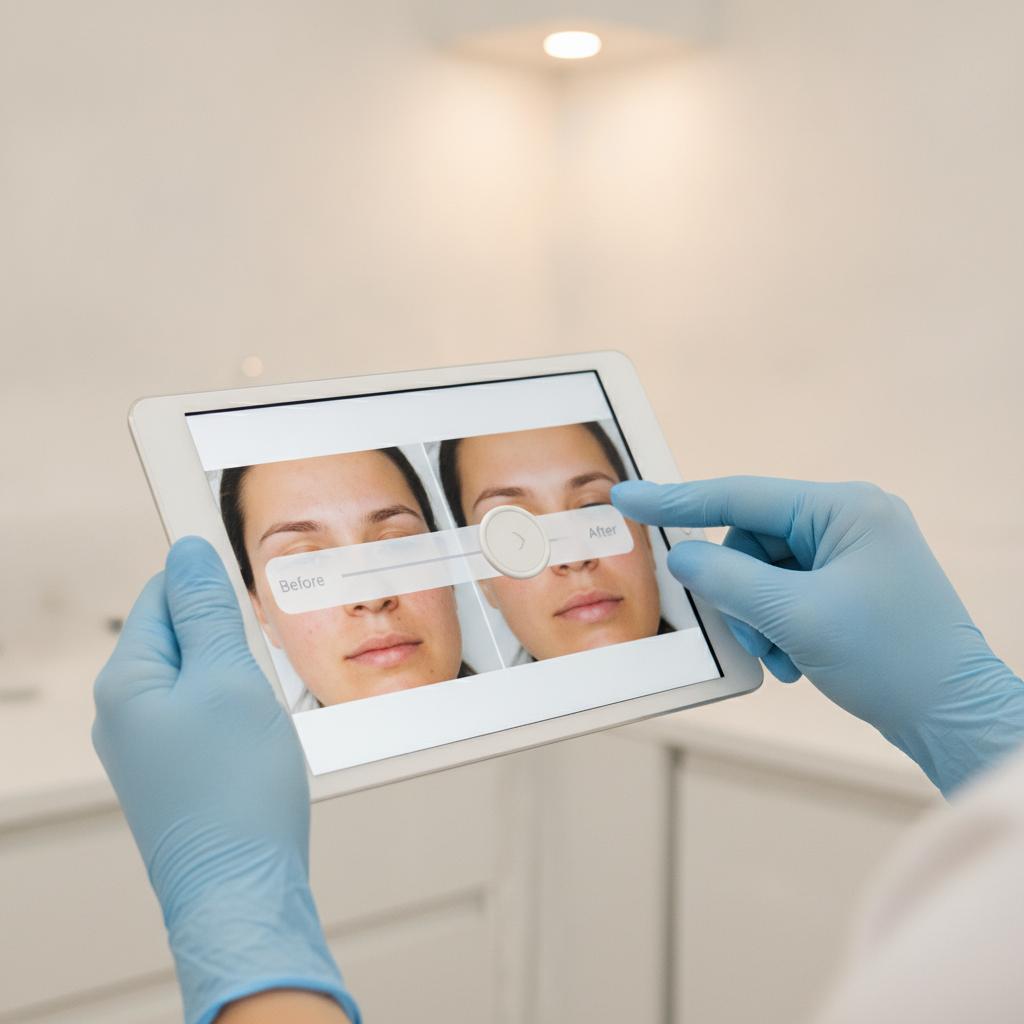
Audit Your Current Gallery for HIPAA Exposure Before Adding a Single New Photo
Before-and-after images of identifiable patients are Protected Health Information (PHI) under HIPAA, which means every photo currently on your plastic surgery website needs a separate, signed photo-release authorization — not just a treatment consent form. HHS penalties run $100–$50,000 per violation as of 2026, and enforcement has intensified. One unauthorized gallery image is one violation. Twenty images is twenty violations.
Pull every image from your current gallery and cross-reference each one against a signed HIPAA photo authorization. The authorization must specify the body areas photographed, the media types approved for use (website, social media, print), who may disclose and receive the images, the stated purpose, and an expiration date or event. A generic treatment consent signature does not cover public gallery posting — the law treats those as two distinct documents. If your plastic surgery practice has been bundling them, you are exposed. Flag any photo without a matching, compliant authorization and pull it offline immediately.
Document what you find and build a records log before you add any new content. Signed HIPAA photo-release documents must be retained for at least six years from their creation or last effective date. A smaller compliant gallery outperforms a large non-compliant one in every scenario — especially when a regulatory inspection or patient complaint triggers a records review. Use version-controlled storage so you can prove the chain of custody for each authorization at audit time.
RxPhoto (PatientNow)
Contact for pricing
Captures HIPAA-compliant consent at the point of photo capture, links each authorization to its image file, and stores records with version control — purpose-built for plastic surgery and cosmetic practices.
Piwik PRO
Free tier available; paid from ~$500/mo
HIPAA-compliant analytics platform that replaces Google Analytics on healthcare sites, eliminating the risk of patient data leaking to third-party ad platforms via tracking pixels.
Critical
Never use Meta Pixel or standard Google Ads remarketing tags on pages that process consultation requests or display patient photos. In 2024, several healthcare providers faced regulatory scrutiny after unauthorized tracking pixels transmitted patient data — including form submissions and medical search queries — to third-party advertisers. The fix: switch to server-side tagging or a HIPAA-compliant CRM like GoHighLevel with a BAA in place.
Build a Separate HIPAA Photo Authorization Workflow for New Patients
Cosmetic surgery practices must never bundle treatment consent with HIPAA photo authorization. The consent packet needs three clearly separated documents: clinical consent for the procedure, HIPAA privacy acknowledgment, and an optional photo-release authorization. 'Optional' matters — patients can decline photo use without it affecting their care, and the authorization form must state that explicitly.
A valid HIPAA photo authorization for plastic surgery website use must include: a specific description of the images (body areas, procedure, approximate dates), the name of who may disclose the information (your practice), the name of who may receive it (your web vendor, your marketing agency), the stated purpose (website gallery, social media, educational content marketing), and an expiration date or event. Use plain-language e-signatures with identity verification — not a checkbox at the bottom of a PDF. Platforms like RxPhoto handle this at intake, tying each consent record directly to its corresponding image file.
Store every signed authorization in a version-controlled record system with a minimum six-year retention window. If your practice uses paper forms, scan and timestamp them. If you switch vendors, confirm the authorization records transfer with the images — they are legally inseparable. Every new patient photo added to your plastic surgery website requires a fresh authorization tied to that specific image and that specific use case. This workflow is ongoing, not a one-time setup.
Shortcut
Display a visible compliance signal on your gallery page — for example, 'All photos shared with documented patient consent on file.' Aesthetic practices that add this language to their gallery pages report improved conversion rates versus practices that display photos with no compliance context. It differentiates your cosmetic surgery website from competitors who post photos without any visible accountability signal.
Standardize Your Photography Protocol for Clinical Credibility
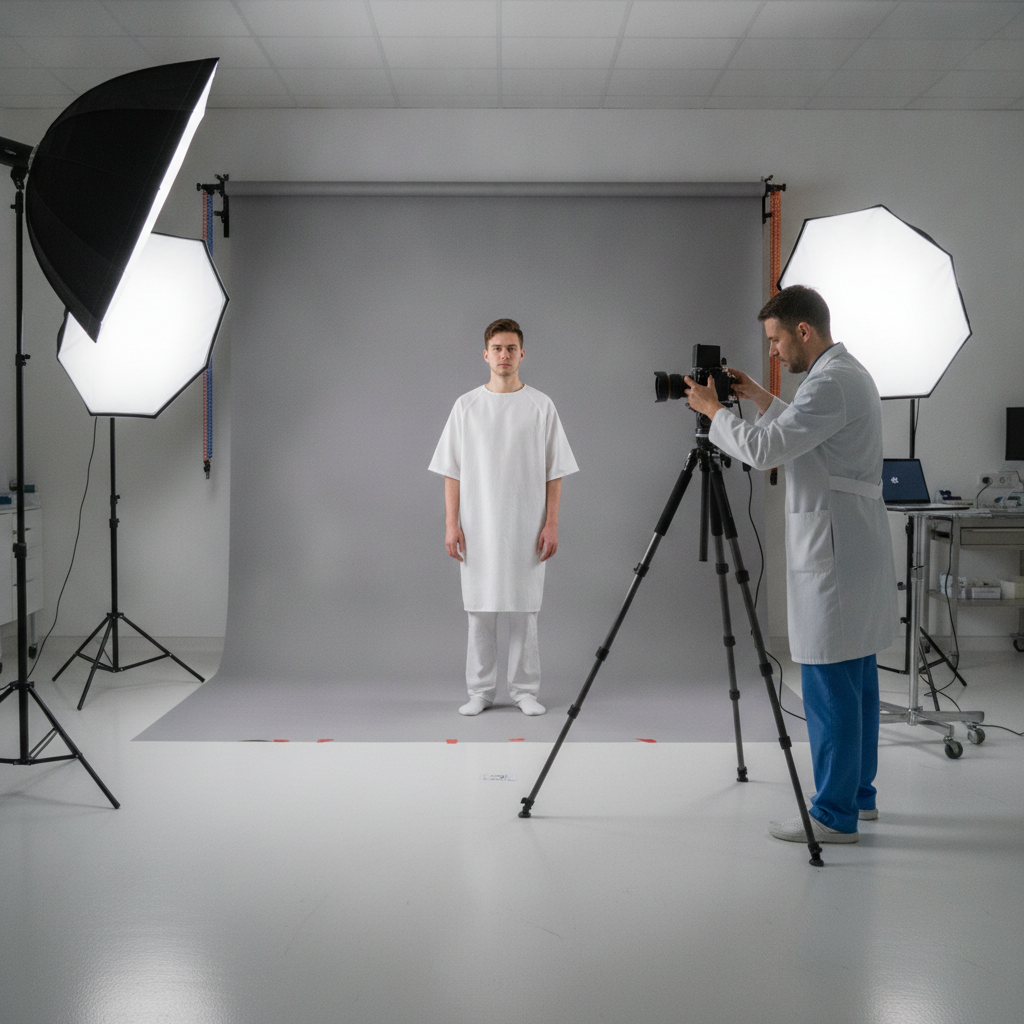
Inconsistent photography destroys gallery credibility faster than a missing procedure label. Prospective patients comparing rhinoplasty results across five plastic surgery sites will immediately discount a gallery where lighting shifts between photos, backgrounds change from white to beige to clinic hallway, and patient positioning varies by fifteen degrees. Every image must be captured under consistent lighting, angles, backgrounds, and patient positioning — and presented without editing or filters. That visual consistency is what most plastic surgeons miss, and it is what separates a well designed plastic surgery gallery from a generic one.
The clinical photography standard for plastic surgery web design galleries: neutral gray or white background, standardized distance from camera, three-angle minimum (front, three-quarter, profile) for facial procedures, consistent clothing or draping for body procedures like tummy tucks and breast augmentation. No skin smoothing. No color grading. The before image and after image must match on every variable except the outcome. That is what sets honest expectations and builds trust with prospective patients who are about to spend $7,000–$18,000.
Assign one staff member or a contracted medical photographer as the owner of your photography protocol. Document the setup: camera model, focal length, f-stop, distance from subject, lighting rig, background color code. Treat it like a clinical SOP, not a creative brief. A high-resolution image captured under a documented, repeatable protocol effectively showcases results in a way that engages visitors and makes your plastic surgery practice stand out when potential patients are browsing three cosmetic surgery sites in the same evening.
RxPhoto
Contact for pricing
Built-in standardized photography templates with guides for patient positioning, angle selection, and background consistency — designed specifically for plastic surgeons and cosmetic practices.
Design a Filterable Gallery Architecture That Plastic Surgeons Actually Need
Filterable before/after galleries — sortable by procedure type, body area, and surgeon — are the defining UX feature of top-converting plastic surgery website designs as of 2026. A prospective patient researching tummy tuck results does not want to scroll through 200 mixed gallery images. She wants to filter to abdominoplasty, select her approximate body type, and see ten to fifteen relevant results in under thirty seconds. The practices generating more traffic from organic search build exactly this way. Sono Bello's gallery page drives over 5,000 individual visits on its own out of 177,000 total site visits — that is what a well-structured gallery does for search engine visibility.
The gallery architecture should include: procedure-level filtering (breast augmentation, rhinoplasty, facelift, body contouring, reconstructive surgery, etc.), body area filtering as a secondary layer, surgeon filtering for multi-provider plastic surgery practices, and an interactive before/after slider on each case so site visitors can drag between states rather than toggling between two static images. Place a 'Book a Consultation' CTA button directly below each individual gallery case — not just in the site header. Prospective patients who spend time on a specific case are pre-sold on that procedure. That is the highest-intent moment on your entire surgery website, and a CTA at that precise point converts far better than one they have to scroll back up to find.
Each gallery case should have its own URL — /gallery/breast-augmentation/case-42/ — with procedure name, result description, and patient context (age range, starting profile) in the copy below the slider. These procedure pages are what capture long-tail search queries like 'rhinoplasty before and after austin' and turn gallery traffic into qualified organic leads. Build the gallery as a content silo with strong local SEO architecture, not a lightbox popup. Procedure pages feed the gallery; the gallery feeds search engines and more potential patients find your practice without paid ads.
Pro tip
For multi-surgeon plastic surgery practices, add a surgeon filter to the gallery. Patients who research a specific doctor before booking convert at higher rates — they arrive at the consultation pre-committed rather than still shopping. This filter also gives each surgeon's results their own URL structure, creating additional procedure page surface area for search engines to index.
Optimize Gallery Images for Core Web Vitals and Mobile Devices
Images cause the Largest Contentful Paint (LCP) event on 85% of desktop pages and 76% of mobile pages — making image optimization the single highest-impact technical action your plastic surgery website can take for Core Web Vitals. Google's 'good' LCP threshold is under 2.5 seconds. A one-second delay in page load time reduces conversions by approximately 7%. Renault's data showed a one-second LCP improvement drove a 14% bounce rate reduction and a 13% conversion lift. For a plastic surgery practice booking $7,000 tummy tucks and $10,000+ rhinoplasties, that math adds up fast.
The recommended technical stack for surgery website gallery pages in 2026: convert all gallery images to WebP or AVIF format (30–50% smaller than JPEG at comparable quality), implement lazy loading so below-the-fold images do not block initial paint, use responsive srcset attributes so mobile devices download appropriately sized files rather than desktop-resolution images, and add low-quality image placeholders (LQIP) so the layout does not shift while images load. Target a Google PageSpeed Insights score of 80+ on both mobile and desktop, with mobile load times under three seconds. Responsive design applied to image delivery — not just layout — is what clears that bar.
Over 60% of plastic surgery searches happen on mobile devices. A gallery that fails on mobile — no pinch-to-zoom on smartphones, tap targets too small to trigger the slider, three-second image loads that time out on 4G — sends prospective patients directly to the next practice in their search results. Mobile-first responsive design is the baseline for any surgery website design competing in 2026, not an upgrade. Every screen size must deliver the same high-resolution image experience at the same load speed.
Google PageSpeed Insights
Free
Provides Core Web Vitals scores (LCP, INP, CLS) for both mobile and desktop, with specific recommendations tied to your actual gallery page URLs.
Squoosh (Google)
Free
Browser-based image compression tool that converts photos to WebP or AVIF and previews quality vs. file size trade-offs before you batch-process the gallery.
Cloudflare Images
From $5/mo
Serves gallery images from a global CDN with automatic format negotiation — delivers WebP to browsers that support it, JPEG fallback to those that do not, without manual srcset management.
Watch out
CLS (Cumulative Layout Shift) is a common gallery failure mode. If image dimensions are not declared before the images load, the page jumps as images render — a jarring experience on mobile that Google penalizes. Always set explicit width and height attributes on every gallery image element, even when using lazy loading. This is the single easiest CLS fix and most plastic surgery web design teams skip it.
Embed a Financing Calculator to Reduce Sticker Shock on High-Ticket Procedures
The average out-of-pocket spend for a patient opening a CareCredit account at a cosmetic practice is $5,125 — and that is the entry point. A tummy tuck runs approximately $11,917 all-in. A facelift ranges from $9,281 to $18,169. A mommy makeover sits at $15,000–$22,000. When a prospective patient hits that number cold on a procedure page, sticker shock kills the conversion. A financing calculator that translates the lump sum into monthly payments removes that friction at the exact moment the patient is deciding whether to book.
Integrate CareCredit's practice-facing payment estimator or Alphaeon Credit's calculator directly on procedure pages and at the base of gallery cases. Show the $11,917 tummy tuck as $198/month at 60 months. Show the $6,992 breast augmentation as $116/month. PatientFi uses income-based approval rather than credit score minimums, which widens your eligible patient pool beyond what CareCredit alone covers. CareCredit accepts applicants with 620+ credit scores. These are conversion tools that match how potential patients actually think about major out-of-pocket purchases — not financing gimmicks.
Add an 'Estimate Your Monthly Payment' section to every high-ticket procedure page, positioned below the gallery cases and above the consultation CTA. This sequencing matters: the patient sees the result she wants in the gallery, calculates a payment she can manage, then books. That three-step path is what separates a plastic surgery website design that generates qualified leads from one that generates traffic with nowhere to go. Practices enrolled with CareCredit and PatientFi — and displaying both options — report stronger average ticket sizes because patients self-select into the financing tier that fits their budget rather than abandoning when the lump sum feels out of reach.
CareCredit Practice Performance Calculator
Free to embed for enrolled practices
Official CareCredit calculator shows patients estimated monthly payments for specific procedure costs; increases both conversion rate and average ticket for enrolled cosmetic practices.
PatientFi
No upfront cost to practices; revenue share on funded loans
Income-based approval expands the eligible patient pool beyond what CareCredit alone covers — particularly for higher-cost procedures like facelift and mommy makeover.
Alphaeon Credit
Free to enrolled practices
Designed specifically for aesthetic medicine; integrates with practice management software and offers a co-applicant option that increases approval rates for higher-cost plastic surgery procedures.
Connect Gallery Traffic to Consultation Bookings with Patient Testimonials and Structured CTAs
Search engine optimization is the highest-converting digital channel for plastic surgery practices, driven by prospective patients actively researching specific procedures. The gallery is where that search intent lands. But landing is not booking. Practices that close the gap between gallery browse and consultation booked add two conversion layers directly into the gallery experience: patient testimonials paired with the matching before/after case, and procedure-specific CTAs that name the outcome rather than just the action. Review management and patient testimonials are not optional additions to a surgery website — they are core conversion infrastructure.
Place video or written patient testimonials — with star ratings and positive feedback — adjacent to the gallery cases they correspond to. A facelift result paired with the patient's written account of her experience produces a stronger social proof signal than either element alone. Pull Google Reviews and RealSelf ratings into the gallery page using a structured review feed. Positive testimonials visible alongside gallery cases convert site visitors to booked consultations at measurably higher rates. Practices with 50+ verified reviews on visible review sites differentiate from competitors who post photos with no accompanying social proof — and that differentiation is visible in both conversion rates and new patients per month.
CTA language on gallery pages should be procedure-specific, not generic. 'Book Your Rhinoplasty Consultation' outperforms 'Contact Us' on procedure gallery pages. 'See If You're a Tummy Tuck Candidate' outperforms 'Learn More.' For plastic surgery marketing, the call to action needs to speak to where the prospective patient already is in her decision process — not restart it. Add these CTAs at three points: immediately after the filterable gallery header, below each individual case slider, and at the page footer above the financing calculator. Social media marketing and email marketing can support awareness, but the gallery CTA structure is what converts that awareness into a booked appointment.
Podium
From $299/mo
Automates Google and RealSelf review requests via text after consultations and integrates review feeds directly into your website for review management without manual embedding.
GoHighLevel
From $97/mo
HIPAA-compliant CRM and pipeline tool that tracks each consultation request from gallery page through booked appointment, with a BAA available for healthcare clients.
Note
Meta Ads and social media marketing support top-of-funnel awareness for plastic surgery practices — they are not direct conversion channels. Use gallery-based organic search and procedure page SEO as your primary lead generation engine. Run Meta Ads to drive awareness to new audiences, then retarget with compliant creative. Meta restricts aesthetic treatment ads and prohibits imagery that could read as body-shaming. Keep the two strategies separate in your attribution model and do not let ad performance mask gaps in your organic gallery conversion rate.
Don't Let One Non-Compliant Photo Undo Your Entire Gallery Investment
The most common plastic surgery website design mistake in 2026 is not a UX problem — it is a records problem. Practices invest $8,000–$25,000 in a custom design, build a beautiful filterable gallery, optimize for Core Web Vitals, and then get flagged because three photos from 2019 do not have matching HIPAA photo authorizations. At $100–$50,000 per violation, that is a risk no gallery conversion rate can offset. Build the compliance infrastructure before you build the gallery. Every new photo needs its own authorization. Every vendor that touches those photos needs a BAA. Every analytics tool on the page needs to be HIPAA-compliant. The gallery is the highest-converting asset on your plastic surgery site — protect it like one.
Most plastic surgery web design agencies hand you a gallery template and a checklist. Geek Powered Studios builds the whole system: custom Webflow or WordPress site, filterable gallery architecture with per-case URLs for organic search, HIPAA-aware form stack with compliant intake workflows, financing calculator integration, and a GoHighLevel pipeline that tracks every gallery visitor from first click to booked consultation. Other marketing companies typically hand off those pieces to separate vendors — we operate as your full marketing strategic arm. One client, Lakeway Cosmetic Dentistry, saw a 133% conversion rate increase after we rebuilt their site and conversion funnel. Serview Home Pros went from nearly zero online presence to 25 qualified leads at a 6% conversion rate in the first year. We have done it across healthcare and home services. Get your free strategy session and we will audit your current gallery for both compliance gaps and conversion leaks before we quote a single line of work.
Frequently Asked Questions
Ready to get started? Contact Geek Powered Studios today.