
A restoration company construction website converts at 8–15% when it clears four structural gates: a one-tap call button visible without scrolling on mobile, a Largest Contentful Paint score under 2.5 seconds, an IICRC certification badge above the fold, and a response system that picks up within 60 seconds. The median restoration site clears none of these and converts at 1.6–2.9% on mobile — the device driving roughly 90% of emergency-intent searches. At an average insurance restoration ticket of $9,300, closing that conversion gap on 500 monthly visitors means five or six additional booked jobs per month without increasing ad spend.
-
5 secondsTime to pass or fail your own homepage audit on mobile
-
30–50%Mobile conversion lift from a sticky above-the-fold call button
-
2.5 secondsGoogle's LCP threshold; average restoration site sits at 9.9 seconds
-
1.8xConversion rate of city-specific pages vs. generic service pages
-
$9,300Average 2025 insurance restoration ticket driving the revenue math
-
60 secondsResponse time threshold that lifts conversion 391% over the 5-min median
-
391%Conversion lift when you answer within 60 seconds of a call
-
17.2%Conversion lift from real crew photos vs. stock imagery on your homepage
Restoration construction websites are categorically different from standard contractor websites. Your visitor is never browsing — they are in an active emergency, on a phone, at a bad hour, and they will hire the first company whose site makes calling feel easy and safe. Emergency-intent searches for water damage, fire restoration, and mold remediation run at roughly 90% mobile traffic, yet the median restoration site converts mobile visitors at only 1.6–2.9% against a 4.8–5% desktop rate. That gap is not an aesthetic problem. It is a structural one. The web design choices that drive conversion in this sector are specific, measurable, and learnable — and most construction websites in the restoration space get them wrong. This guide walks through 7 concrete steps — from a five-second homepage audit to response infrastructure — that move restoration construction websites from the 2–4% median into the 8–15% range that top-performing contractor sites consistently hit. Budget 3–5 hours for priority fixes and 2–4 weeks for a full redesign implementation. If you want to learn the patterns yourself or hand this list to a developer, every step here delivers a measurable result you can track.
Before you start
- Access to your current website's backend (WordPress, Webflow, or your builder's CMS)
- Google Search Console and Google PageSpeed Insights accounts (both free)
- IICRC certification documentation and insurance certificates ready to upload
- CallRail or a similar call-tracking account to measure baseline call volume before changes
- At least 5 genuine Google reviews with reviewer names and dates visible
- A smartphone to audit your own mobile homepage as a first-time visitor would see it

Audit Your Homepage the Way a Panicked Homeowner Actually Sees It
Pull up your own website on a phone at arm's length and set a five-second timer: if you cannot read your phone number, confirm your service area, and see an IICRC badge before the timer goes off, your construction website is losing jobs right now. Emergency-intent restoration searches run at roughly 90% mobile traffic — far above the 71% mobile share general contractors' sites see — yet the median restoration site converts mobile visitors at only 1.6–2.9% compared to 4.8–5% on desktop. That gap exists almost entirely because most construction sites were designed on a desktop and tested on a desktop. Understanding the patterns that hurt your mobile experience is the first step toward fixing them. Stop thinking about how your site looks on a monitor and start thinking about how it performs on the device your audience actually uses.
Open Google PageSpeed Insights, paste your homepage URL, and check your Largest Contentful Paint score on mobile. The average restoration website's main content takes 9.9 seconds to render — 7.4 seconds above Google's 2.5-second LCP threshold, according to Borah Labs' 2026 benchmark study. Every additional second of load time on mobile drops conversions approximately 7%, meaning a site at 5 seconds has already surrendered 35% of potential leads before a single word is read. That result compounds quickly when you consider the audience: people in crisis who will not wait and will not scroll. The ones who do stay are giving you a narrow window — don't waste it with a slow hero image. Check your score, write it down, and use that number as your baseline.
Write down three things during this audit: your current mobile LCP score, whether your phone number is tap-to-call and visible without scrolling, and whether your service area appears on screen one. These three data points define your starting line. The rest of this guide walks you through fixing each one, step by step. The lesson here is simple — if you would not find the call button quickly on your own phone, neither will a homeowner standing in two inches of water at 11 p.m. Most construction sites never run this check on themselves, which is exactly why the ones that do pick up an immediate advantage.
Google PageSpeed Insights
Free
Gives your exact LCP score on mobile and flags the specific image or script causing the delay — faster to act on than a generic speed report.
CallRail
From $45/mo
Source-attributing call tracking lets you measure baseline call volume by channel before any changes go live, so you can prove ROI after the redesign.
Quick Check
70% of small business websites lack a clear homepage CTA, per Small Business Trends research. Before you audit anything technical, confirm you actually have a button — not a text link — prominently placed. Button CTAs earn 45% more clicks than text links for the same offer. If your construction website's homepage only has a text link in the nav, that is your first fix.
Install a One-Tap Call Button That Follows the Visitor Down the Page
A sticky above-the-fold click-to-call button on mobile is the single highest-ROI change a restoration construction website can make: it lifts mobile conversions 30–50% for emergency trades. A sticky bottom-of-viewport call bar — even without an above-fold button — lifts call volume 25–40% on its own. For a homeowner standing in two inches of water at 11 p.m., the distance between your phone number and their thumb is the difference between a booked job and a missed one. Strong web design in this category means buttons that are impossible to miss, not ones hiding behind elegant layouts. This approach earns results because it removes the single biggest point of friction in the mobile user experience.
Implement two call buttons simultaneously: one fixed in the site header that persists as the visitor scrolls, and one anchored to the bottom of the mobile viewport. Both should be large enough to tap with a thumb, high-contrast against the background (aim for at least a 4.5:1 contrast ratio to stay clear of ADA Title III exposure — Seyfarth tracked 8,667 federal lawsuits against contractor sites in 2025), and labeled with action-first copy like 'Call Now — We Answer 24/7' rather than just a phone number string. Bold typography on the button label helps it stand out. The tone of the label matters too: direct, urgent copy outperforms clever phrasing every time. These are the types of details that separate conversion-focused web design from brochure-style sites. Clean button design with strong contrast earns clicks; cluttered or low-contrast buttons leave money on the table.
After installing the buttons, connect them to CallRail with separate tracking numbers so you can see which button placement drives more calls within the first 30 days. That data lets you track which placement works and tells you whether to double down on the header or the bottom bar — and gives you proof of improvement to share with your team or your marketing partner. Most construction company websites that add this infrastructure see measurable call lift within two weeks. The combined effect of two well-placed buttons with clear copy is the fastest way to move the needle without touching a single line of content.
Hotjar
Free tier available; from $39/mo
Heatmaps show you exactly where mobile visitors tap and where they stop scrolling, so you can confirm your call button sits in a high-attention zone.
ADA Warning
Emergency banners with low color contrast and call buttons without accessible labels are among the most common targets in ADA Title III federal lawsuits. Label every button with descriptive text — not just an icon — and verify WCAG 2.1 AA compliance before launch. A post-launch accessibility audit typically costs $500–$1,500 and is far cheaper than litigation.
Place Trust Signals Above the Fold: IICRC Badge, Reviews, and Real Crew Photos
The IICRC certification badge is the single most powerful professional trust signal a restoration construction company can display: 70% of customers prefer certified businesses and 85% report willingness to pay more for certified services. Put the badge in the header or directly beneath the hero headline — not buried on a 'Why Us' page three scrolls deep. Potential clients in crisis mode will not scroll; they scan the first screen and either call or leave. Great design in this sector means the right credentials are visible in the first viewport, not hiding behind beautiful imagery. A clean, well-organized above-the-fold section that showcases your certifications immediately builds the kind of confidence that makes people click the call button.
Directly below your hero section, place a row of real Google reviews with reviewer names, star ratings, and dates visible. Ninety-three percent of buyers read reviews before hiring, and the average customer reads around 10 before making a decision. Generic '5-star rated!' copy does not substitute for verbatim review text — visitors need to see that real people in their city trusted you with a $10,000–$14,000 insurance claim. Let the work speak for itself through specific, named customer stories rather than vague praise. This approach lets your social proof do the trust-building work and reach potential clients who are still evaluating whether to call. Project case studies that include real outcomes are especially powerful in this context — they answer the unspoken question every visitor has: 'Can these people actually help me?' When you showcase real results, the message lands far more effectively than any marketing copy alone.
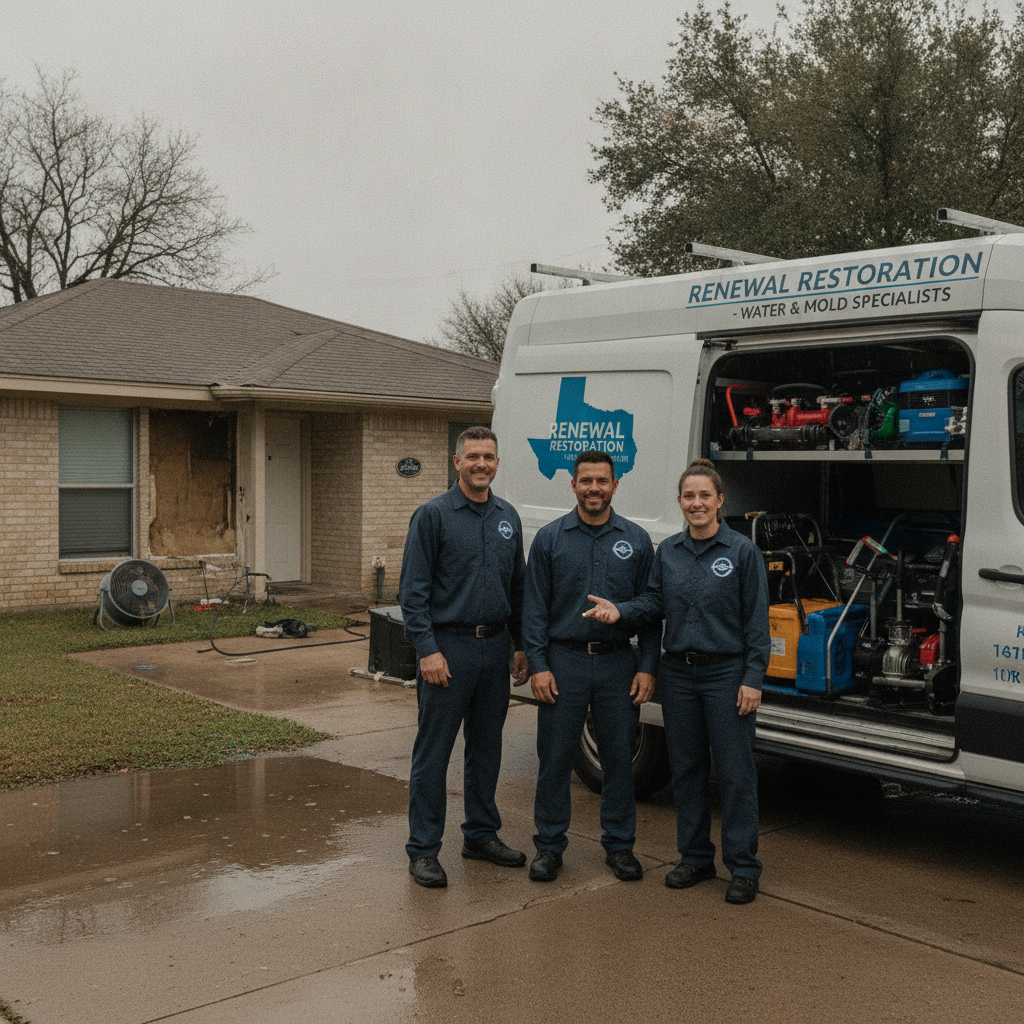
Replace any stock imagery on your homepage with real project photography: your uniformed crew, your wrapped trucks at a job site, before-and-after shots of completed projects. Real staff photos improve website conversions by 17.2% because human brains process faces 60,000 times faster than text. McCarthy Building Companies and other top-tier construction websites use imagery as evidence, not decoration — restoration companies should apply the same approach. One authentic photo of your team at a real project location does more for confidence than a collection of generic stock visuals. Relevant projects shown this way create immediate credibility; irrelevant projects or staged images do the opposite. Strong photography is not decoration — it is substance. The visuals your audience sees in those first seconds either build trust or undermine it, and the ones that perform best are always grounded in reality.
Pro Tip
Shoot your crew photos with trucks in the frame and your company logo visible on uniforms. That combination — faces, branded gear, real project location — creates credibility that stock imagery cannot match. It also gives local visitors a visual confirmation that you actually operate in their area, which matters when they are evaluating whether to call you or a competitor. Project case studies with before-and-after real project photography extend this same principle beyond the homepage.

Fix Your Page Speed: Get LCP Below 2.5 Seconds on Mobile
Your hero image is almost always the culprit for a slow LCP score on restoration construction websites — a full-width photo of water damage or a before-after composite can easily weigh 1–3 MB if unoptimized. Convert all homepage images to WebP format, compress them to under 150 KB each without visible quality loss, and add the 'loading=eager' and 'fetchpriority=high' attributes to the hero image so browsers prioritize it. These three changes alone can cut your LCP by 3–5 seconds on mid-range Android devices — the most common device type among emergency-intent visitors. The approach works because it targets the single biggest bottleneck first: the hero image that browsers must render before anything else becomes visible. Good photography is worth keeping — just not at the cost of a 9-second load time.
After images, audit your page builder's JavaScript load order. Heavy builders like Divi or some WordPress themes load dozens of scripts before rendering any content, which destroys mobile LCP. Switch to a lightweight theme or use a plugin like WP Rocket to defer non-critical scripts. If you're on Webflow, the platform handles most of this natively — but third-party chat widgets, pop-up scripts, and marketing pixels still need to load asynchronously. Speed on this platform is a structural advantage, which is one reason modern restoration construction websites are increasingly moving to it. Builders that can't deliver clean load times are builders that cost you leads. The ones that do deliver sub-2-second performance are the ones helping contractors win in competitive regions.
Retest with PageSpeed Insights after each change rather than batching fixes. This lets you isolate which fix delivered the most improvement. The target is a mobile LCP under 2.5 seconds. Sites that hit sub-2-second load times on mobile add roughly 5% conversion per additional second they shed — for a restoration company paying $542–$775 per water damage lead nationally, that math is worth taking seriously. A site at 9.9 seconds that drops to 2.5 seconds can realistically recover 50%+ of previously lost leads. Every second you shave off the load time is a step closer to the conversion rates that top construction websites reach. Set a calendar reminder to recheck performance monthly — page speed is not a one-time fix.
WP Rocket
$59/year (single site)
Handles script deferral, image lazy loading, and caching in one plugin — the fastest path to LCP improvement for WordPress-based construction websites without touching code.
Squoosh
Free
Google's own image compression tool converts photos to WebP and previews quality at each compression level before you export — essential for real project photography that must look sharp but load fast.
Build a Services Page Architecture Around How General Contractors and Restoration Crews Actually Get Called
Most construction websites organize their services page around internal company structure: 'Water Mitigation,' 'Structural Drying,' 'Contents Restoration.' Homeowners in crisis don't think in those categories — they search 'flooded basement Austin' or 'fire damage repair Dallas.' Your services page architecture should mirror the search query, not the operations manual. Create individual service pages for water damage, fire and smoke, mold remediation, and storm damage as separate URLs, each with its own headline, IICRC credential callout, and click-to-call button. This approach lets each page focus on one urgent need and rank for it independently. Think of it as a collection of targeted landing pages, not a single capabilities list — each one is a front door for a different type of emergency. A flooring restoration page for a specific city, for example, will consistently outperform a generic restoration page in that region.
City-specific landing pages convert at 1.8x the rate of generic pages when they include real local signals: neighborhoods served, common local damage causes (in Texas, burst pipes from winter freezes and roof damage from hail are top examples), and real project photography taken at actual local job sites. If you operate in five cities, that's five additional pages — each one capable of pulling emergency search traffic and converting it at nearly double the rate of your generic homepage. This is where building construction websites for a regional market pays off most clearly: local specificity wins where generic capabilities pages lose. The combined impact of local copy, local images, and a local Google Business Profile citation is something no generic page can replicate. Hospitality and healthcare sectors figured this out years ago; restoration companies in this space are just now catching up.
Clear navigation matters as much as page content. Visitors should reach any service page in one tap from the homepage menu. 'Services' as a top-level nav item with a dropdown showing each service type keeps the structure clean without requiring visitors to hunt. Restoration potential clients don't browse — they search, land, scan, and call. Every extra click between them and your phone number costs you a job. Construction company websites that structure navigation around buyer urgency — not internal org charts — win because they remove friction at the exact moment it matters most. Strong navigation design is one of the most overlooked opportunities in this space.
SEO Note
Each city-specific page needs a unique H1 (not just a swapped city name), unique body copy referencing local conditions, and a Google Business Profile citation matching that service area. Duplicate pages with only the city name changed get filtered out of local search results quickly. If your construction company website currently has generic service pages, each one is an opportunity to create a location-specific version with real local detail.
Add Insurance Claims Guidance Directly to Your Website — It Closes Jobs Faster
90% of customers find the restoration process stressful, and 70% specifically want more transparent communication around insurance claims. A dedicated 'Working with Your Insurance' section — not a buried FAQ, but a visible page linked from your main navigation — reduces homeowner hesitation and speeds up job authorization. This isn't content marketing; it's a conversion tool. Insurance-involved jobs remove the homeowner's budget ceiling, close faster, and scope larger than out-of-pocket work. Average insurance payouts for water damage run $11,000–$14,000 nationally, versus a $3,867 average for self-pay restoration jobs. Helping potential clients understand the process is one of the fastest ways to shift them from hesitant to confident. Most competitors skip this kind of depth entirely — which means the ones that deliver it stand out immediately. If you want to talk to homeowners at the moment they care most, this is the page that does it.
The page should walk visitors through three things: what documentation the restoration crew captures for the claim, what the homeowner's role is during the process, and what a realistic timeline looks like from call to completed project. Use plain language. Skip the legal disclaimers that make construction websites read like insurance contracts. The goal is to let visitors visualize hiring you and having the claim handled — not to overwhelm them with caveats. Let the detail of the process, clearly explained, do the trust-building work. Project case studies that include insurance outcomes are especially powerful here — they showcase real project scope and real claims resolution. When people can read about similar situations handled well, they find it easy to picture hiring you. That is exactly the kind of information that moves a hesitant visitor to a confident caller. Published case studies with real numbers — claim amounts, timelines, crew size — perform far better than vague success stories.
Include a specific arrival-window commitment on this page, not just '24/7 available.' A written commitment — 'Our crew arrives within 2 hours of your call, 24 hours a day' — is the kind of concrete promise that separates your site from competitors whose messaging is vague. Mold begins developing within 24–48 hours of a moisture event, and homeowners who understand that timeline respond faster. Your insurance guidance page is where that urgency becomes a trust signal rather than a pressure tactic. Construction company websites that walk buyers through the insurance process stand out in a sector where most sites ignore the topic entirely. This kind of education helps you close jobs that competitors lose to hesitation. The reliability your brand shows on this page — in writing, with specific estimates of timeline and process — is what moves someone from 'I'll think about it' to 'I'm calling now.'
Set Up Response Infrastructure So Your Website's Performance Doesn't Die at the Phone
78% of customers hire the first contractor who responds, and lead conversion rates drop by more than 50% after 30 minutes. A restoration construction website that converts at 10% means nothing if calls go to voicemail at 9 p.m. Responding within 60 seconds lifts conversion by 391% compared to the median 5-minute contractor response time. The website gets the phone to ring; your response infrastructure determines whether that ring becomes a booked job. Winning in this sector comes down to who picks up — and construction websites that drive volume without a response system in place waste every dollar they earn from organic traffic and paid ads. If the site performs but the phone doesn't answer, the whole system falls apart. The patterns that separate 8–15% converters from 2–4% ones are not all on the page — some of them are on the phone.
Set up a live answering service or an AI-powered phone agent (tools like GoHighLevel's AI voice bot or Hatch cover this for $200–$600/month) to handle after-hours calls with a live response and an immediate text follow-up. Pair this with a simple intake form on your website that triggers an automated SMS within 60 seconds — not an email that gets read at 8 a.m. the next morning. Phone calls convert to 10–15x more revenue than web form leads for restoration companies, and callers convert 30% faster with 28% higher retention, so the architecture is always phone-first. General contractors in adjacent building construction sectors who have added this infrastructure report closing 20–30% more after-hours leads within 90 days. The combined effect of fast web design and fast response is what separates the ones who reach 8–15% conversion from the ones who stay at 2–4%. Moving quickly matters: every minute of delay is a minute your competitor's phone might ring instead.
Track everything from the start. Set up CallRail with source-level attribution so you can see which pages and which ad campaigns generate calls, not just clicks. Top-performing contractor construction websites hit 8–15% conversion by combining a sticky above-the-fold call button, sub-2-second mobile load, source-attributed call tracking, embedded reviews, and a 60-second response time. The median site converts at 2–4%. That delta — at an average insurance restoration ticket of $9,300 in 2025, up 11.6% from $8,333 in 2024 — means five or six additional jobs per month on the same traffic volume. At that revenue level, the infrastructure pays for itself in the first week of operation. This is the lesson every high-performing restoration operator agrees on: web design without response infrastructure is a lead funnel with a hole at the bottom. Start with the phone, then agree on your tracking setup, and let the data guide every future decision about where to spend.
GoHighLevel
From $97/mo
Handles the full response stack: AI voice answering, automated SMS follow-up, and pipeline tracking in one platform built for home service contractors.
Hatch
Custom pricing (typically $300–$600/mo)
Specialty contractor communication platform that fires multi-channel follow-up (SMS, email, voicemail drop) within seconds of a form submission or missed call.
The Real Closer
Your website doesn't close the job — your phone does. A beautiful, fast, trust-stacked construction website that sends calls to an answering machine after 6 p.m. will still lose to a mediocre site whose owner picks up on the first ring. Build the response infrastructure before you invest heavily in traffic. A $200/month answering service beats a $5,000 ad campaign for after-hours restoration calls every time.
The Construction Website Redesign Mistake That Costs Restoration Companies $50K+ Per Month
Most restoration companies treat a website redesign as a branding project: new colors, bold typography, a portfolio of completed projects. Those things matter — but they are secondary. A site converting at 3% on 500 monthly organic visitors books 15 jobs. The same traffic at 10% books 50. At a $9,300 average insurance restoration ticket, that is $325,500 in additional monthly revenue on the same ad spend and the same SEO footprint. The design choices that drive that gap are not aesthetic — they are structural: a one-tap call button, a sub-2.5-second mobile load, IICRC credentials above the fold, and a response system that picks up within 60 seconds. Get those four right before worrying about anything else. Every dollar you spend on traffic while your site converts at 2% is a dollar that stands to earn 3–5x more after these fixes are in place. The math is not complicated — but most construction websites never run it.
Ready to get started? Contact Geek Powered Studios today.